
Place orders days ahead, review before they reach the kitchen, and quickly spot what needs attention.
When orders are tracked on clipboards and spreadsheets, details can get missed—leading to missed meals or dietary mistakes.

Choices written on paper get re-keyed for the kitchen and for billing. Every handoff is a chance to misread, lose or mis-charge an order.

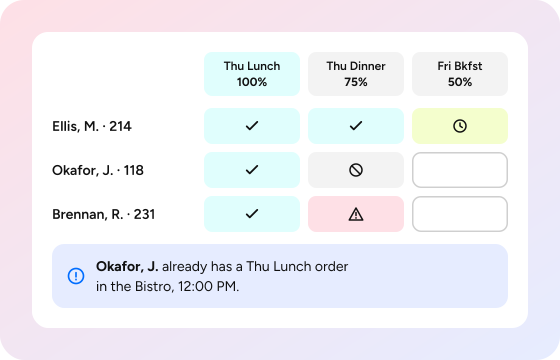
A blank on the sheet could mean "not ordered yet" or "not eating." You find out at service time.

Allergens and diets depend on whoever takes the order. Turnover and agency staff make that hard to rely on.

Orders go straight to production. A wrong item is caught when the tray reaches the resident, or not at all.
Batch Order Entry (BOE) brings resident meal pre-ordering into one dashboard. Order days ahead, review before the kitchen, and see who still needs attention.
Each meal is ordered or marked No Service Requested, with a note if needed. Progress shows exactly who still needs attention.
One session covers every resident and meal for the days ahead. One community saves servers 15–20 minutes per ordering period.
Each item is checked against the resident's meal plan, credits, overages and taxes, however many orders you enter.
Orders print at each meal's request time, so production starts with real numbers, not guesses.
Dietary filters flag issues as orders are entered,* and approvers review every order before it prints.

In assisted living, memory care and skilled nursing, staff order for residents, often days ahead. On clipboards and spreadsheets, small gaps become missed meals and dietary mistakes.

Take orders for residents as menu choice grows, without adding paperwork.

Order for every resident with a review step before anything reaches the kitchen.

Order by unit or apartment range, and keep every meal accounted for through busy shifts.

Run the health center on the same platform as your other dining venues with no separate tools.
In assisted living, memory care and skilled nursing, staff order for residents, often days ahead. On clipboards and spreadsheets, small gaps become missed meals and dietary mistakes.
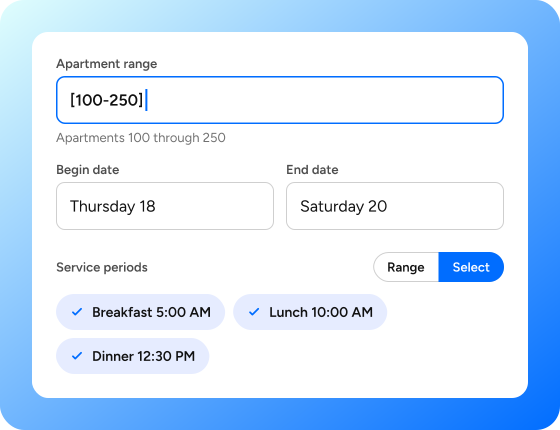
Choose the department, the residents and the days and meals to cover.
Choose the department, the residents and the days the meals to cover.
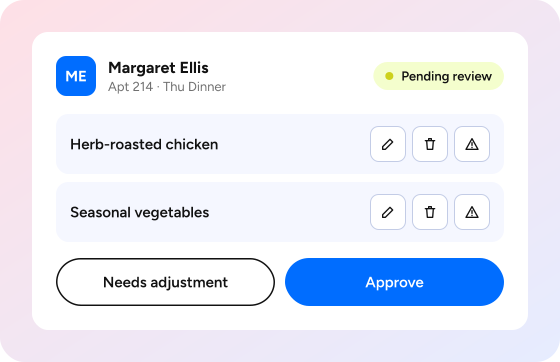
Approvers check each order, then approve it or flag it for adjustment.
Orders print at each meal's request time, or earlier when needed.

Batch Order Entry (BOE) is FullCount's workflow for pre-ordering meals for many residents across several days and meal periods from one dashboard. Staff enter orders, approvers review them, and tickets print to the kitchen on schedule.
BOE is built for assisted living, memory care, skilled nursing and CCRC health centers, where staff order on residents' behalf. Any department that pre-orders meals for patients or guests, such as hospital or event catering teams, can use it too.
Yes. Every order is linked to the resident's account, so eligibility, balances and restrictions apply automatically. Each item is checked against the meal plan, credits, overages and taxes, however many orders are entered in a batch.
Users with the Order Approver role review each resident's order before it goes to the kitchen. They can edit or remove items, approve the order, or mark an item or the whole order as Needs Adjustment. Approved orders lock until an approver reopens them, and every approval is recorded.
Staff mark that meal as No Service Requested and can add a note explaining why. The meal then counts as accounted for, so a skipped meal is a recorded decision rather than a blank.
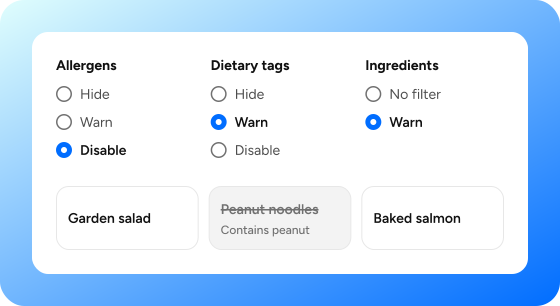
Yes, when your community has Advanced Nutrition. For each ordering session, staff choose whether items with flagged allergens or dietary tags are hidden, shown with a warning, or disabled, and whether ingredients trigger a warning.
Each meal period prints automatically at the request time set for it. Authorized staff can also process upcoming meal periods early when the kitchen needs a head start.
Yes. Staff can select residents by apartment range, such as [100-250], by a list of apartments, or with wildcards, as well as by customer type or report group.
It flags them. If a resident already has an order for that meal in any department, BOE shows that order's items, department and time, so staff can avoid ordering twice.
